Setup
Headphones
AIAIAI bluetooth headphones with transmitter
- Plug into headphones jack on interface
- Turn on headphones transmitter: hold down button until lights go on
- Hold down middle button headphones until you hear a noise ⇒ headphones are on and connected
- (the other two buttons on the headphones are volume up and down)
Why transmitter? Zero latency (bluetooth can have some latency).
Guitar
- Plug in guitar cable to Input 2 on Interface.
- Turn on guitar. Turn on volume and tone knob full.
Interface
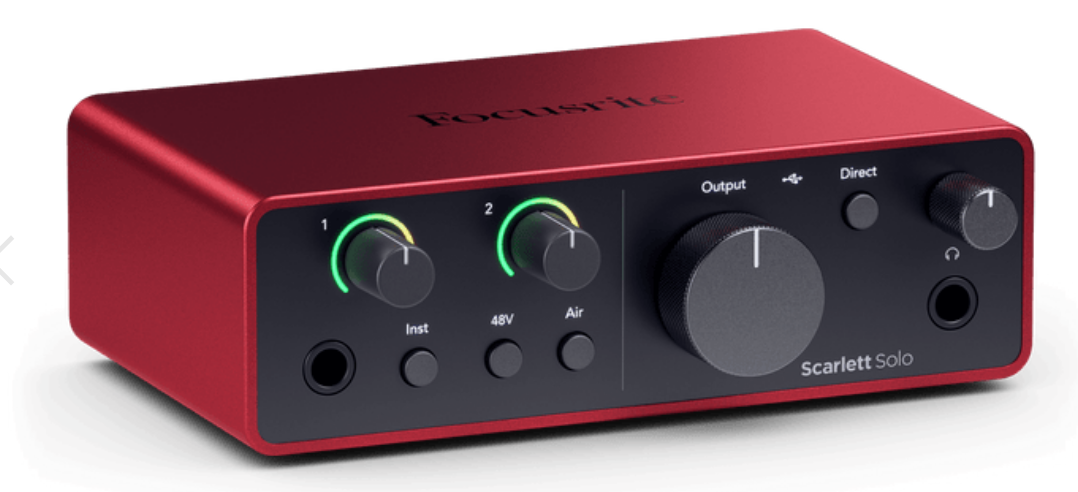 Focusrite Scarlett Solo https://focusrite.com/products/scarlett-solo
Set up as external soundcard.
Focusrite Scarlett Solo https://focusrite.com/products/scarlett-solo
Set up as external soundcard.
- Plug into computer: USB-C to USB-C (on back of interface).
- Lights go on = working.
- Direct monitor: ON (should be lit green).
- INST: ON (should be lit red). Strum guitar to check if it’s connected. The INST gain knob should be lit in the green to yellow area for good level when strumming guitar (put on headphones and check how it sounds).
- Sound settings on computer:
- Output: set to USB (Scarlett Solo) ⇒ Now everything that’s played on the computer is by default heard on the headphones. (But you can still set up individual devices to come out another way.)
- Input: set to USB (Scarlett Solo) ⇒ So that computer can “hear” guitar.
- Big knob (MONITOR) = volume for headphones (and speakers).
- IF you also want sound coming out of speakers (as well as the headphones) plug in LINE OUT left and right at the back of the interface.
- XLR cable input: for microphone. Don’t push the 48V button if the microphone doesn’t need external power, can be damaged by it!
Garageband
Guitar and bass track
- Click on Details:
- Input = Input 2 (from the interface).
- If you want to hear effects:
- Tick the option “I want to hear my instrument as I play and record” and press the button Direct Monitor on the interface to turn it off.
- Otherwise don’t tick “I want to hear my instrument as I play and record” because we already have direct monitor on the interface.
- Make sure that both displayed input and output say “Scarlett Solo USB”.
- Add drum track:
- Click on little plus icon.
- Select a drummer.
- Activate loop (icon next to play and pause buttons).
- Click on guitar track again to hear it together with the drum track.
For Yousician
- Direct monitor can be off.
- In Settings > Advanced audio settings
- Input device: Scarlett Solo USB
- Input channel: Input 2