2025-01-20
Adding a slider and knob thing (miniMidi) as a control
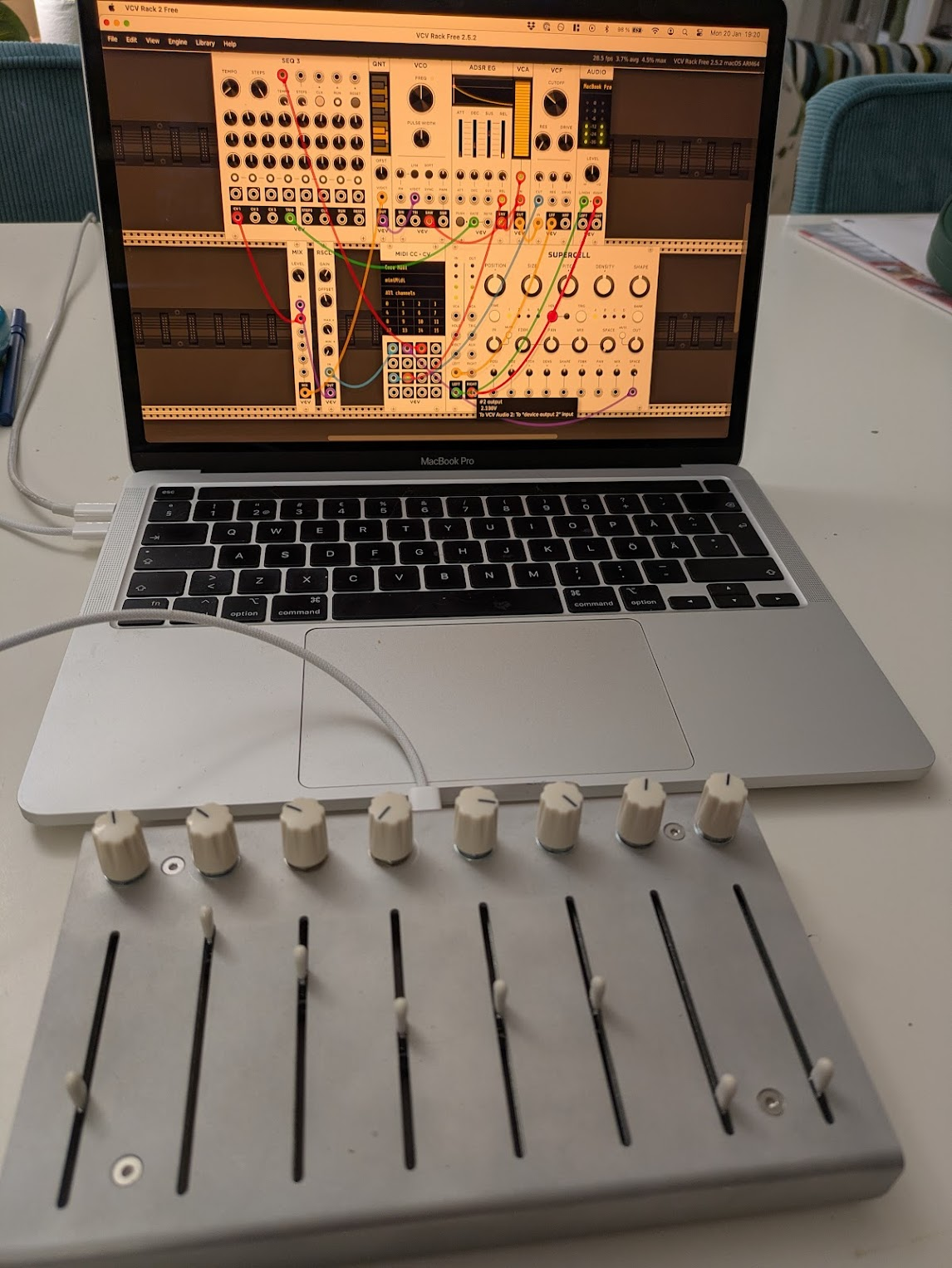
Simple patch (VCO > VCA > VCF) with a sequencer and a quantizer.
To map the miniMidi to outputs: MIDI CC > CV module.
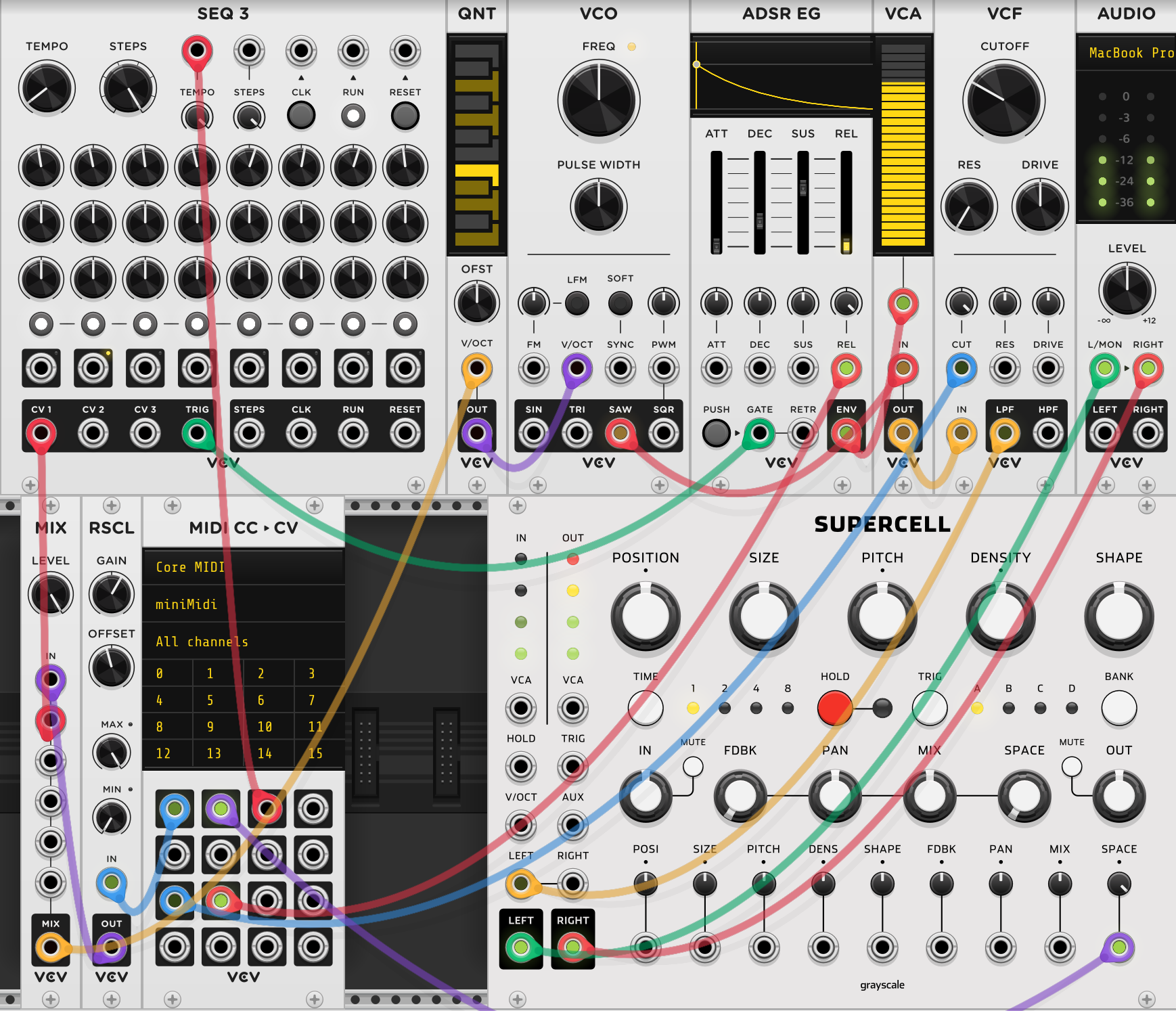
Knob 1 (channel 0): mapped to sequencer to change the notes. This is routed through a rescaler (RSCL module) that restricts the 10V input to 2V (by setting the gain to 20%). Offset is set to -1, so that the output will be from -1 to 1, resulting in notes up and down one octave. The OUT of the RSCL gets mixed together in the MIX module with the output from the sequencer SEQ 3.

Knob 2 (channel 1): controls the space (i.e. how much reverb) on the module SUPERCELL. Knob 3 (channel 2): controls the tempo on the SEQ 3 module. Slider 1 (channel 8): mapped to the cutoff (CUT) on the VCF (cutoff frequency set to 80 Hz, and attenuverter of CUT set to 100%). Slider 2 (channel 9): mapped to release REL of ADSR
Some learnings:
- It’s nice to have the SUPERCELL reverb after the filter, because then when turning the filter all the way down you’re left with a nice after-sound that fades out slowly. That generally applies to mixers and effects: better to have the mixer before the effects, so when turning down the mixer the effects are fading out nicely instead of being all reduced at the same time.
- Cool to increase the tempo a lot with maximum reverb, then suddenly turn the tempo all the way down. Big background rumble that slowly fades out.
- The bigger knobs (e.g. CUTOFF on the filter) are there to set the minimum voltage/frequency/tempo you want. And then with the little attenuverter, depending on what percentage that is set at, you set the maximum you would want. For example setting the cutoff on the filter at 80 Hz and the attenuverter at 100% means that I will get minimum 80 Hz frequencies through, up to the possible maximum of the VCF.
Full patch:
2024-12-31
Red Means Recording Tutorial 2/4 - Macrooscillator
https://www.youtube.com/watch?v=CFQmdm_5-bs
Hora Stereo Mixer 8 Audible Instruments Macro Oscillator 2 Impromptu CLKD clock generator SEQ 3 sequencer Count Modula 8x8 Gate Sequencer Alright Devices Chronoblob
Sequencer
Create a sequence of voltages/events. Something is happening over time and creating events.
Clock generator, e.g. Impromptu CLKD. Generates pulses at certain intervals, e.g. at 120 bpm.

A square wave LFO can be used as a clock as well.
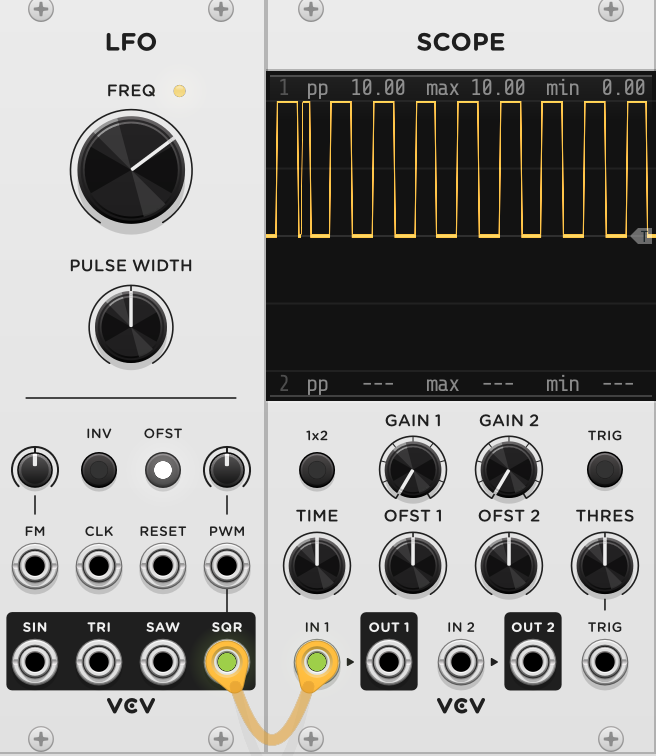 With two LFOs you can modulate the frequency of the first LFO with a sine wave from the second LFO (connect SIN and FM) = a variable clock. It slows down and speeds up with the progression of the sine wave.
Clocks, triggers and gates
Triggers are very tiny gates Most clocks have a duty cycle, i.e. the time during which the wave is high vs. low. By default 50%, meaning for the certain set rate of the LFO or clock, the wave will be high for 50% of that, and low for 50% of that. The duty cycle of an LFO can be adjusted with “pulse width” and be really tiny, essentially a trigger.
ppqn = pulse per quarter note 1X = one quarter note, 2X = one eighth note
8x8 Sequencer: can create rhythm.
Clocks have RESET inputs that can be connected to RESET on sequencers to trigger the start of everything at the same time. (On some modules/clocks you have to manually hit RESET as well to activate it)
Quantizer
Bernoulli gate (Audible Instruments)
Get probability into your synthesis
Chronoblob (Alright Devices)
Dual clock syncable delay
2024-11-10
Red Means Recording Tutorial 1/4 - Subtractive synth voice
https://www.youtube.com/watch?v=BTcP3DofZLY Shape sound with ADSR and VCF.
- MIDI > CV: generate CV from keyboard input.
- VCO: Feed the V/OCT output from MIDI > CV module into the V/OCT input on VCO. Generate wave with SIN.
- SCOPE: Make waves visible.
- VCA: IN = sine wave from VCO. OUT = going into audio module.
- AUDIO: set to output audio device to hear the sounds.
Now, to shape the sine wave’s volume with an LFO:
- Sine wave output from VCO into IN on VCA.
- OUT on VCA into AUDIO.
- To modulate the volume of the sine wave coming from the VCA, an LFO sine wave output is patched to the CV input of the VCA.
The volume of the tone goes up and down periodically with a speed that depends on the LFO’s set frequency.
To instead shape the sine wave’s volume with an envelope:
- ADSR needs input signal, coming from a gate.
- GATE output on MIDI > CV module into GATE input on ADSR. So with every push on the keyboard, both a CV with information for the pitch of the note is generated (going into the VCO, that generates a sine wave at that pitch), as well as a gate signal (on/off) going into the ADSR, that controls the volume on the VCA.
The volume of the tone is shaped by the envelope, so it might build up and then fade slowly, depending how ADSR parameters are set.
Now we will include a filter to remove either the higher or lower notes.
- Change wave form from sine to saw wave, since VCFs don’t really have anything to grab on to with a sine wave.
- Makes really fun sound when the tone is held and the cutoff knob is turned very much between low and high. A kind of spacey digeridoo sound.
LFO LFOs and VCOs are sometimes interchangeable, but LFOs (very low frequencies, outside of human hearing range) are usually used to “move” or modulate other things. They are like “invisible hands”.
2024-10-23
Most minimal
Makes a constant sound MOST minimal setup VCO, AUDIO
- VCO: Selected wave output (e.g. sine) ⇒ input into AUDIO
- AUDIO: Turns the signals into audio output. Select the desired audio channel to hear it.
Minimal setup with keyboard input
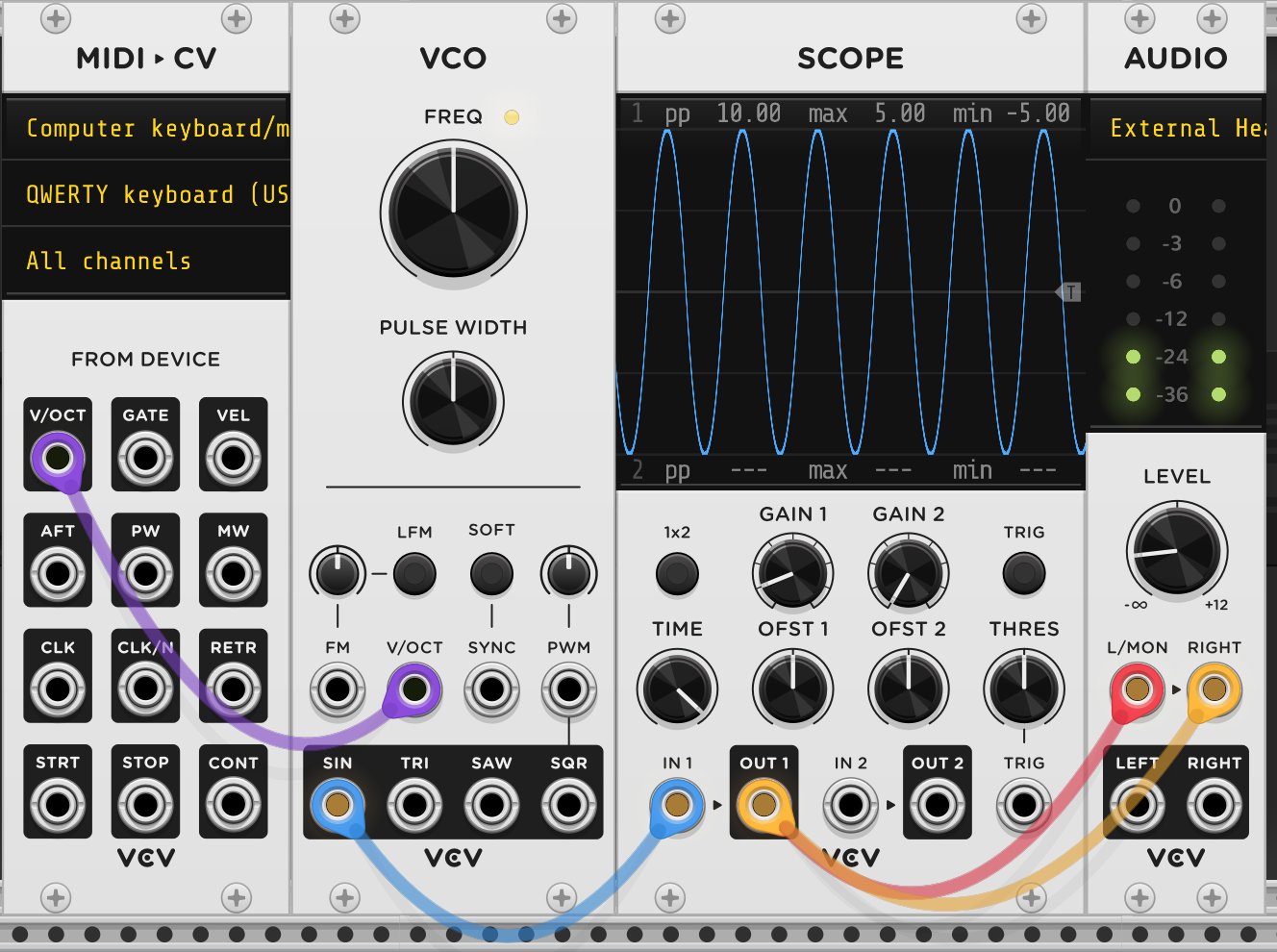
Change pitch of constant tone with keyboard and visualise what happens. MIDI>CV, VCO, SCOPE, AUDIO
- MIDI>CV: Input is computer keyboard. Connect V/OCT to V/OCT on VCO.
- VCO: Creates a constant oscillation (sin, tri, saw or sqr). By connecting V/OCT from MIDI input to V/OCT on VCO, I can control the frequency (pitch) of the generated oscillation by pressing different keys on the keyboard.
- SCOPE: Connect the wave output to the input to see it visualised.
- AUDIO: Turns the signals into audio output. Select the desired audio channel to hear it.
2024-06-10
Patch 1
Followed https://www.youtube.com/watch?v=TB-7vRnc5nw from 343 Labs Youtube channel.
MIDI from keyboard:
- V/OCT into V/OCT on oscillator. Takes signal from keyboard and converts it to pitch information for the oscillator.
- Gate into Gate on envelope generator. Works as on/off switch for the MIDI input. By patching it to envelope, we can make a more nuanced on/off switch. VCO:
- Sawtooth wave into IN on filter. Generates a continuous sawtooth wave. By patching it into the filter we can modulate the timbre of the tone (brighten or dull).
- FM into ENV on envelope generator. To modulate the envelope. FM makes it more squawky. VCF:
- CUT into ENV on envelope generator. To modulate the cutoff of the envelope.
- LPF into channel in on amplifier. Filtered signal goes into the channel input of the amplifier. ADSR:
- ENV into CV input on amplifier. Total output from the envelope directs the signal intensity on the amplifier.
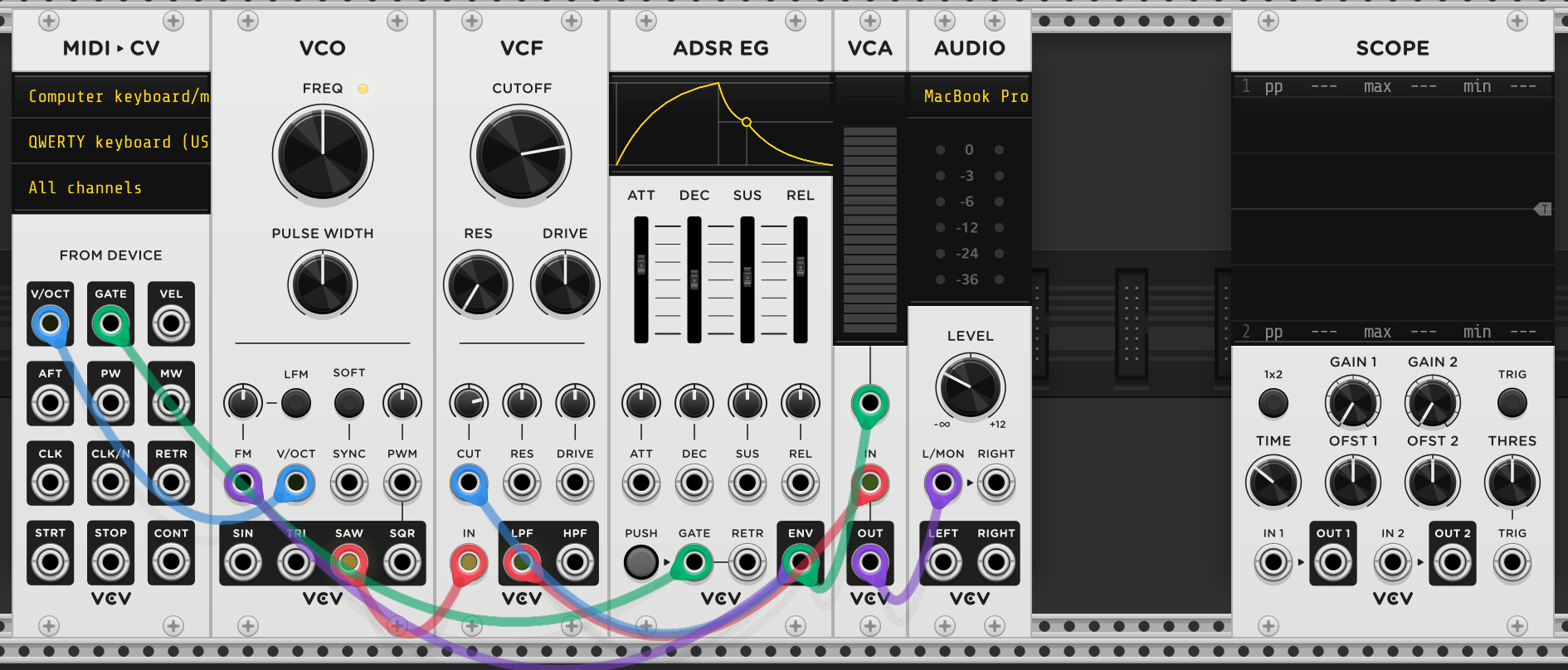
Patch 2: Modulation
Changing parameters over time Followed https://www.youtube.com/watch?v=z_rZKodSQPc from 343 Labs Youtube channel.
MIDI:
- Gate output to Gate input on ADSR. Our on/off switch
- V/OCT output to V/OCT input on oscillator.
Oscillator:
- OUT to IN on filter.
Filter:
- Lowpass output to amplifier channel input.
ADSR:
- Envelope output to CV in on amplifier. Envelope output is modulating, i.e. moving the loudness of the sound.
- Envelope output to Frequency input of filter. Envelope output is modulating, i.e. moving filter cutoff and therefore the brightness of the sound.
Amplifier:
- OUT to IN of audio.